
UPS Installation
NOTE: When installing the UPS or making input and output connections, comply with all relevant
safety codes and standards
Rack Installation
The Liebert UPS will be mounted in the rack by the rack provider. When installed in a rack enclosure, the GXT4 UPS must be supported by a shelf or rack-mount rails. The GXT4 units ship with all required hardware for rack-mount installation. Because different rack-mount options install differently, refer to the installation instructions provided with the rack mount kit being used.
Connecting Cables
The GXT4 rear panel has an input cable and plug, output receptacles and output cable(s)
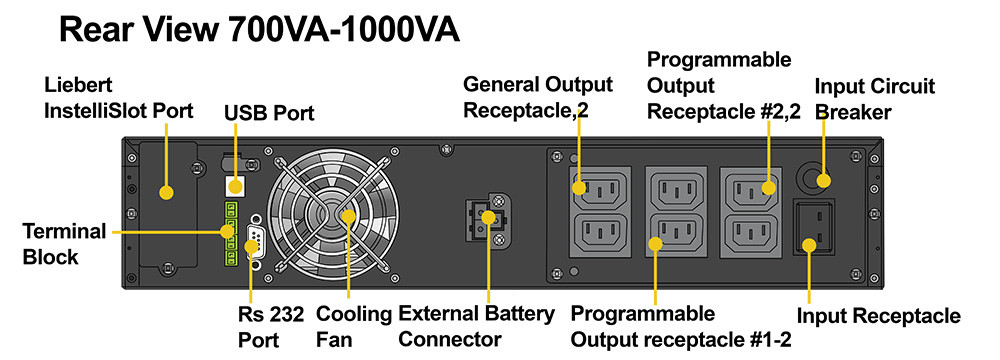
Connecting to AC Mains and Loads
Ensure that all the loads are turned Off. Prepare an input power supply that is properly protected by a
circuit breaker in accordance with national and local electrical codes. The wall receptacle must be
grounded. We recommend installing an upstream circuit breaker of the same series as the input circuit
breaker of the GXT4.
The specifications of the input circuit breaker on the rear panel of the UPS are listed in the following table
GXT4-700RT120 10A
500 – 2000-VA models have 3 groups of outlets:
• One group is not controlled (always On).
• Two groups are controlled with programmed responses or an SNMP network
Verify that the equipment is plugged into the appropriate outlets if any of the outlets will be controlled.
NOTE: Do not overload any output receptacle. Output cable length should not exceed 10 m (32.8 ft).
To connect equipment and input power:
1. Plug equipment into the appropriate output receptacles on the rear of the GXT4.
2. Plug the input plug of the GXT4 into the input power connection.
NOTE: If the input plug is to serve as the disconnecting device, the wall socket/outlet must be near the
UPS and must be easily accessible.